Users prompt blind, then judge the output as good or bad without ever seeing what "normal" looks like for the system they are talking to.
← Back to patterns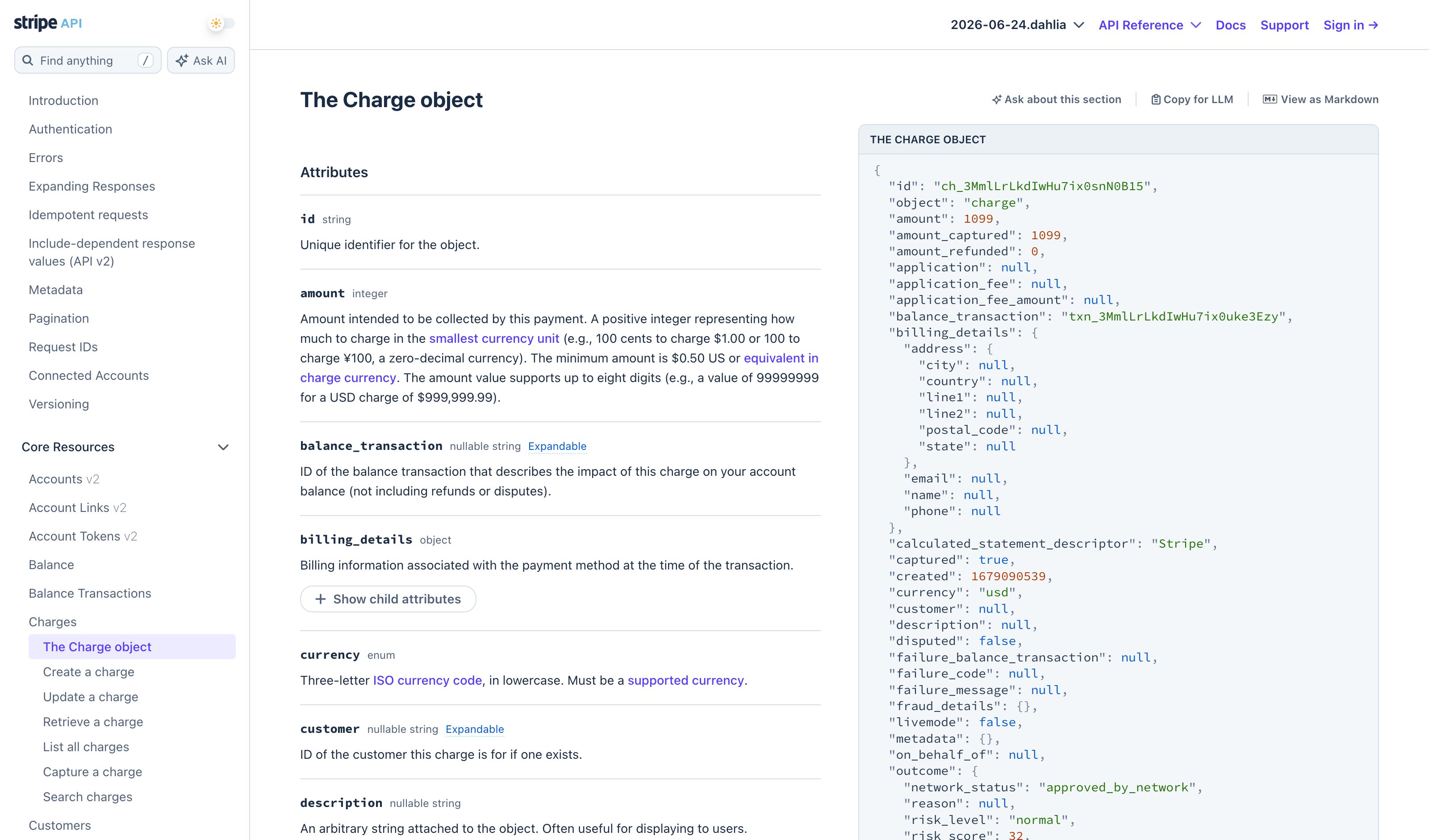
Inline & Contextual
Research PatternSample Response
Show the Shape Before You Ask
Output Skeleton previews the structure of your answer once you have prompted. Sample Response inverts that: before you fill the form or submit the prompt, see a typical example of what you will receive — calibrating expectations, format, length, tone — without paying for a real run.
Metaphor
Specimen
Interaction
Pre-flight Preview, Calibration
Use case
First-Time Users, Form-Driven Tasks, Calibrated Expectations
Failure mode
Run-To-Calibrate
Control mechanisms
Example Cards · Format Previews · Sample Output Tab
Reference examples
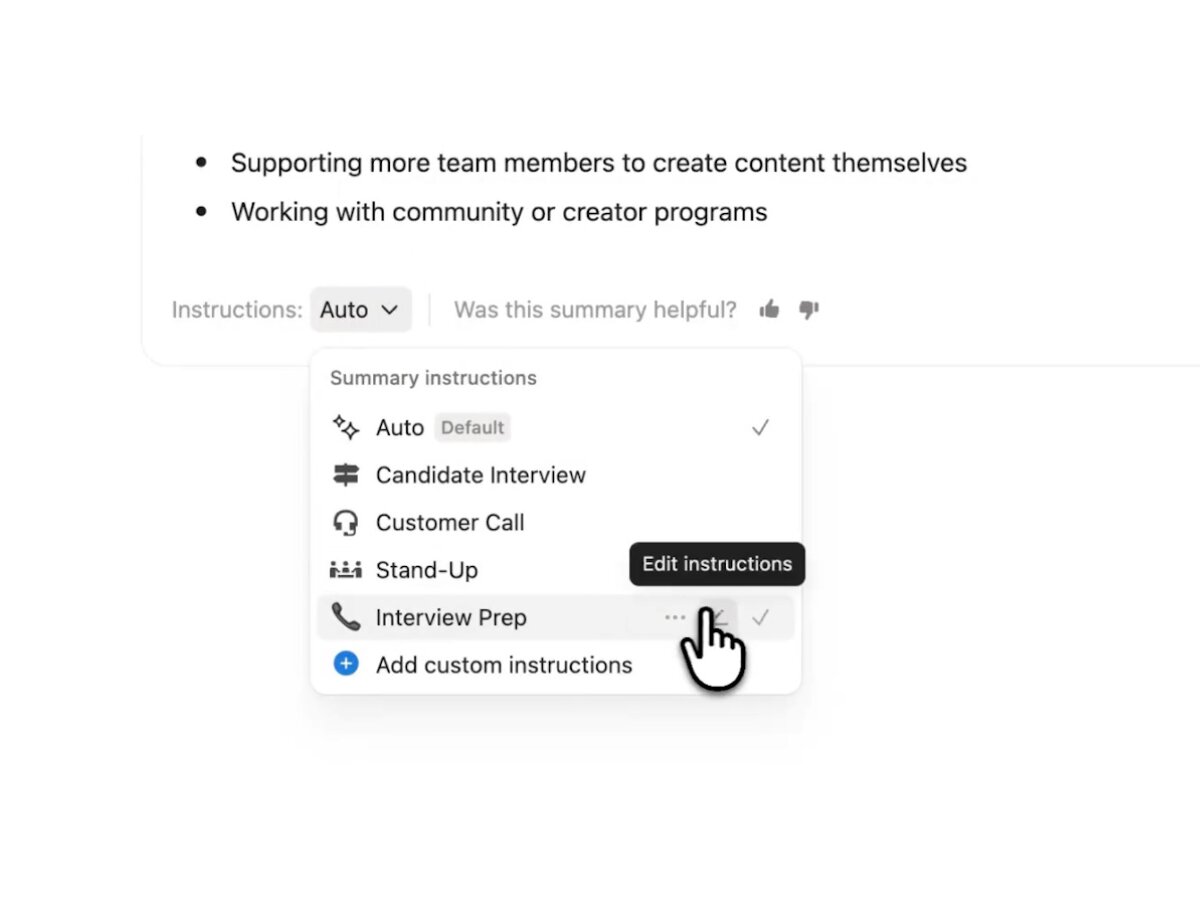
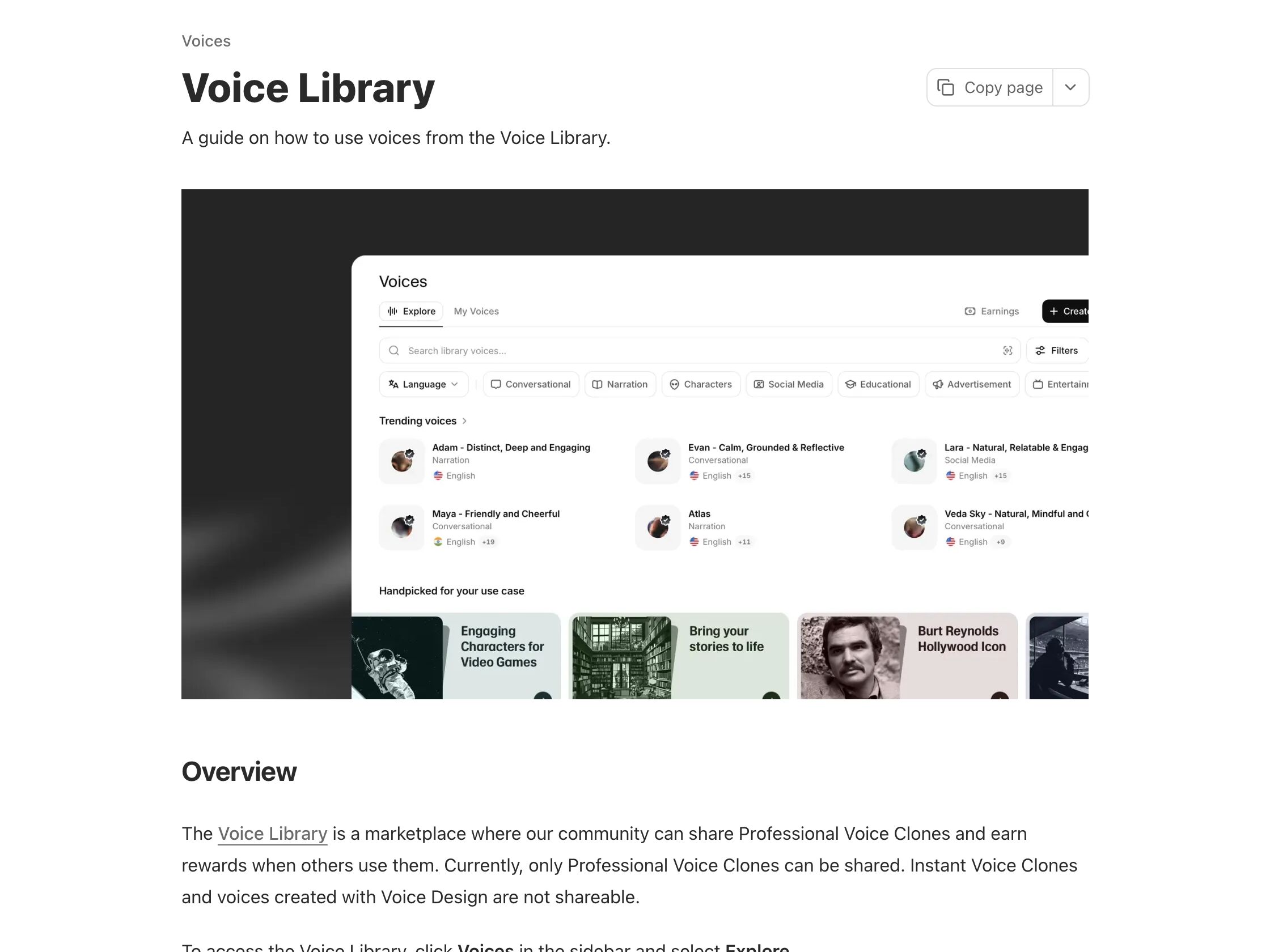
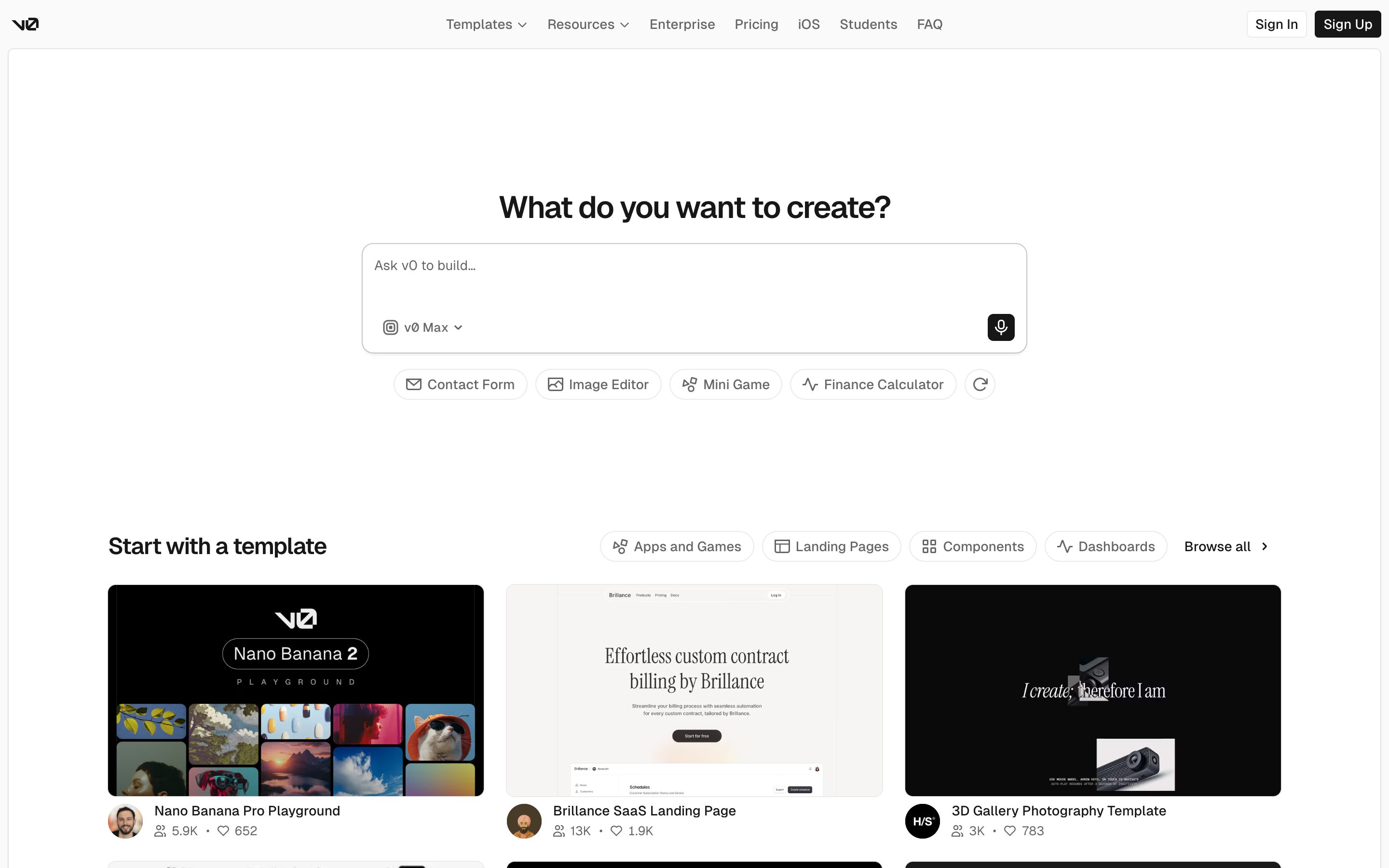
Stripe API Reference response examples · Notion AI Meeting Notes summary instructions · ElevenLabs Voice Library previews · Vercel v0 template gallery
Interactive Example
The live side-by-side is the comparison.
This prototype already contains the contrast between chat and the pattern response. It stands as the primary comparison surface for this page.
You prompt blind, then judge what you cannot calibrate.
Chat is empty until you type, so you commit a query before you have any idea what "normal" looks like for the system. You pay the full cost of a real run, then grade the result good or bad against a baseline you never had — with no way to know whether the shape, length, or tone was typical or a fluke.
Sample Response moves a representative example in front of the query rather than after it. Seeing a labeled specimen of a typical answer — with the inputs that produced it — calibrates expectations before you spend a run, so deviations stand out and you adapt your prompt to the closest match instead of discovering the format by trial and error.
"Show the shape before the ask, and the first prompt stops being a guess."
DOPE Lens
How this pattern improves AI interaction quality.
Observability
A representative example is visible before the user invests in their own query
Directability
Users browse a small set of samples to find the closest match before committing
Predictability
Sample shape demonstrates what "normal" looks like so deviations stand out
Explainability
Each sample is labeled with the inputs that produced it so the user can adapt
Fit
Where it earns its place.
Use it
when
when
First-time or infrequent users need to calibrate expectations about format, length, and tone before committing to a prompt.
Avoid
when
when
Outputs are highly variable or the user is already a fluent operator who knows what to expect — the sample becomes scaffolding without leverage.
Closest neighbours
No product ships this exactly — these come closest.
This is a research pattern — we describe a UX move that no shipping product implements cleanly today. The entries below are adjacent: they share the spirit of the pattern even if they take a different shape.
Stripe API Reference · response examples
Stripe
Every endpoint reference renders a realistic JSON response in the right column — the canonical "sample response" pattern in developer docs. Calibrates field shape, types, and length before the user spends a real request.
Visit Stripe ↗
Notion AI Meeting Notes · summary instructions
Notion
Before a meeting is summarized you pick its shape by name: the Instructions dropdown at the bottom of the meeting notes block defaults to Auto and offers built-in formats for meeting types such as a customer call or stand-up. An older guide screenshot gave each format a one-line outline (Standup: progress, blockers, action items); Notion's March 2026 image of the current dropdown shows names only. Custom instructions open as a template page where you set sections, tone and length, and any can be your default. Notion documents no sample summary of a format before you choose it, so the first real summary is the sample. New instructions apply to new recordings, and Retry summary re-runs an existing one.
Visit Notion ↗
ElevenLabs · Voice Library previews
ElevenLabs
Every shared voice plays a sample when you click it, with a preview per language where the voice has several, before you spend a credit on your own text. Owners can set that preview from one of their own 70–150-character generations, so it is real output rather than a studio read. Use voice then opens Text to Speech with the voice preselected. It calibrates timbre and delivery, not your script: the sample speaks the owner’s words.
Visit ElevenLabs ↗
Vercel v0 · template gallery
Vercel
Components and pages rendered as starting samples — fork the closest match, then ask v0 to riff on it. Sample-as-springboard, not sample-as-preview.
Visit Vercel ↗
Research Frame
Why this pattern exists, and where it breaks.
Render a representative sample of what a typical answer looks like before the user invests in their own query — calibrating expectations, format, length, tone.
Chat is empty until you prompt; there is no native surface for "what would this normally produce" before the cost of a real query is paid.
A canned sample can over-anchor users on one specific shape; freshness rots if the model changes faster than the sample.
Common questions
What people ask about this pattern.
When should I use the Sample Response pattern?
+
First-time or infrequent users need to calibrate expectations about format, length, and tone before committing to a prompt.
When should I avoid the Sample Response pattern?
+
Outputs are highly variable or the user is already a fluent operator who knows what to expect — the sample becomes scaffolding without leverage.
What problem does Sample Response solve?
+
Users prompt blind, then judge the output as good or bad without ever seeing what "normal" looks like for the system they are talking to.
Why is chat the wrong fit for this?
+
Chat is empty until you prompt; there is no native surface for "what would this normally produce" before the cost of a real query is paid.
Related Patterns
Curated connections, not just neighbors.
Hand-picked relationships — what this pattern pairs with in practice, what it replaces, what it builds on, and what builds on it.
Often paired with
Output Skeleton
Sample Response shows what normal looks like before you ask; Output Skeleton renders the structure of the actual run.
Often paired with
Templates
Templates turn the prompt into a form; Sample Response shows a typical result before you fill it in.
Often paired with
Prompt Enhancer
Sample Response calibrates what to expect from the answer; Prompt Enhancer then sharpens the prompt as a diff you review.